-
📱Apps in My Toolbox 🧰
Canadian Citizens JournalApps in My Toolbox “People ask what tools I actually use to do this work. So here’s my real toolbox. For video editing, I use Cute Cut Pro and VN Video Editor. They give me full control over layers, audio, screenshots, and pacing — which matters when accuracy matters. For capturing evidence, I use Picsew for scroll screenshots and Procreate Pocket to annotate and highlight key details. For transcription and drafts, I use Dictation Pro and transcription tools to turn speech into text quickly and accurately. When platforms reject files, I use Media Converter instead of losing content. For explanations and research support, I use AI tools like ChatGPT, Claude, and Grok — strictly as translators, not decision-makers. I choose the sources. I read the originals. AI helps explain — it doesn’t replace verification. These tools don’t make someone a journalist. Documentation does. Discipline does. This is the Canadian Citizens Journal.” #AppsInMyToolbox #HowItsDone #BehindTheScenes #ContentCreator #VideoEditing #MediaLiteracy #PlainEnglish #IndependentJournalism #DocumentTheProcess https://drive.google.com/drive/folders/1zSniUsS7E_flBLvWUKZrZwcOW5LyvFAP41 views -
How I Do This — And Why I’m Sharing It ⬇️
Canadian Citizens JournalHow I Do This — And Why I’m Sharing It “Before I share any breakdowns, I want to explain the process — because how information is handled matters just as much as the information itself. Everything starts with primary sources, not headlines. That means official records such as House of Commons transcripts, known as Hansard, parliamentary committee meetings and testimony, government reports and websites, Auditor General findings, court filings, and official data. I don’t sit and read thousands of pages of government language. Most Canadians don’t have the time — and that’s not an accident. Instead, I use AI tools to translate complex government language into plain English and to flag what would matter to Canadians. This includes wording that affects rights, costs, accountability, or long-term impact, as well as language that is vague, softened, or designed to minimize consequences. From there, I look more closely at what’s missing, what’s being framed as harmless, and what isn’t being said at all. I then cross-check by comparing other documents, past policies, outcomes, committee testimony, audits, and legal challenges. If something can’t be verified, I say that. Once the information is clear, I create visual explainers using direct wording from the documents, so people can see the language for themselves rather than relying on interpretation. I don’t ask anyone to trust me. I show where the information comes from. All sources used are linked in the post attached to this video so anyone can read them directly. I’m also sharing this process because I’m only one person. I can’t watch everything — and no single journalist, creator, or outlet ever could. There are already good people asking questions, documenting records, and explaining what they find. The more people who know how to follow official documents and spot concerning wording, the harder it becomes for important details to slip by unnoticed. This isn’t about politics or outrage. It’s about awareness. When more people understand where information comes from and how to read it critically, accountability becomes harder to avoid. That’s why I’m sharing the process — not to tell anyone what to think, but to help more people know how to look. This is the Canadian Citizens Journal.” Links are provided so anyone can review the original sources themselves. AI tools are used to translate and summarize — not to replace verification. ⸻ 🔗 SOURCES & LINKS (Referenced in the voiceover) 📄 Primary Government Sources (Start Here) House of Commons (Canada) Hansard (official transcripts): https://www.ourcommons.ca/en/parliamentary-business/house-debates Committees & testimony: https://www.ourcommons.ca/Committees/en Parliamentary calendar & documents: https://www.ourcommons.ca Auditor General of Canada https://www.oag-bvg.gc.ca Justice Laws (Canada) https://laws-lois.justice.gc.ca Canada Gazette (regulations & notices) https://www.gazette.gc.ca Statistics Canada https://www.statcan.gc.ca Statistics Canada (official data source): https://www150.statcan.gc.ca/n1/en/type/data (Note: This links directly to Statistics Canada’s data tables, which load more reliably than the main portal for some users.) ⸻ 🔍 Research & Verification (Cross-Checking) Parliamentary Budget Officer https://www.pbo-dpb.gc.ca Office of the Information Commissioner https://www.oic-ci.gc.ca Office of the Privacy Commissioner https://www.priv.gc.ca Federal Court of Canada https://www.fct-cf.gc.ca Supreme Court of Canada https://www.scc-csc.ca ⸻ 🧠 AI Tools (Used as Translators, Not Authorities) (Included for transparency — not endorsements) ChatGPT https://chat.openai.com Claude https://claude.ai Google Gemini https://gemini.google.com Grok (X / xAI) https://x.ai ⸻ 🎬 Editing & Documentation Tools I Use Cute Cut Pro https://apps.apple.com/app/id618790117 VN Video Editor https://apps.apple.com/app/id1343581380 Picsew (scroll screenshots) https://apps.apple.com/app/id916366645 Procreate Pocket (annotations) https://apps.apple.com/app/id916366645 (if applicable — swap if different) Media Converter https://apps.apple.com/app/id1294207675 Dictation Pro https://apps.apple.com/app/id507874739 #CanadianCitizensJournal #PlainEnglish #HowItsDone #CivicEducation #PublicRecords #GovernmentTransparency #DocumentTheTruth #IndependentJournalism #MediaLiteracy #CriticalThinking #BehindTheScenes #AIAsATool #ContentCreator #VideoEditing #ExplainTheProcess #GreenScreen https://drive.google.com/drive/folders/1zSniUsS7E_flBLvWUKZrZwcOW5LyvFAP27 views -
🎥 How I Create My Videos 🇨🇦
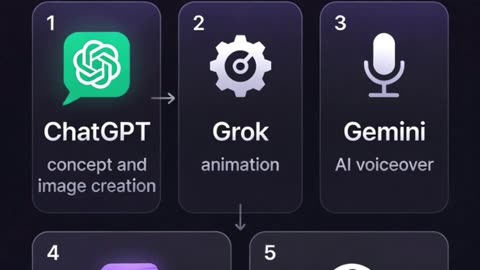
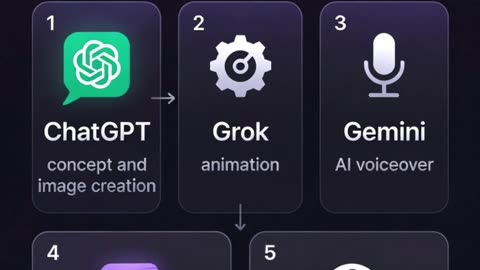
Canadian Citizens JournalI get asked how I make my videos, so I wanted to explain my process and show a little inside each app I use. I’ll link the finished video so you can see how it all comes together. Here’s the basic flow I use: 1️⃣ Starting with the idea I describe what I’m envisioning to ChatGPT, and it creates the image — in this case, a glowing digital map of Canada with Alberta highlighted like a heartbeat. 2️⃣ Animating the image I send that image to Grok, who does all of the animation to bring it to life. 3️⃣ Creating the voiceover I use Gemini AI for the voiceover. Since the audio can’t be downloaded directly, I screen record it and extract the audio for editing. 4️⃣ Main editing I bring everything into Cute Cut Pro, where I sync the voiceover with the visuals and build the main timeline. 5️⃣ Finishing the video To avoid hard cuts between clips, I use VN Video Editor. I duplicate each animated clip and reverse the second one so it plays forward and then back, creating a smooth, looped finish. 💡 Tip: the more you play around in the apps, the easier it gets. You don’t need to know everything upfront — experimenting is how it starts to click. This is my overall process from start to finish. I’m sharing it so that if anyone wants to start making their own videos, you can see how I approach it and adapt it in your own way. This is the Canadian Citizens Journal. 🇨🇦 Heartbeat of a Nation Video: https://rumble.com/v6zyqpa-heartbeat-of-a-nation.html #VideoCreation #ContentCreator #CreativeProcess #BehindTheScenes #DigitalCreation #LearnByDoing https://drive.google.com/drive/folders/1zSniUsS7E_flBLvWUKZrZwcOW5LyvFAP27 views