-
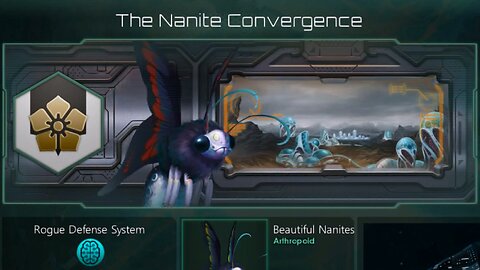
STELLARIS - REMOVING RESTRICTIONS FOR MACHINE EMPIRES [EN/CZ]
Templayer's Retro Gaming GuildCZ title: STELLARIS - ODSTRANĚNÍ OMEZENÍ PRO STROJOVÁ IMPÉRIA [EN/CZ] Biological and lithoid portraits for machine empires, non-default civics. CC subtitles contain some additional commentary. ------- Jedná se o biologické a lithoidní portréty pro strojová impéria a nevýchozí zřízení (civics). NEZAPOMEŇTE SI ZAPNOUT MANUÁLNĚ VYTVOŘENÉ TITULKY! Dělá se to vpravo dole (aspoň přímo na youtube). Playlists / seznamy videí: Stellaris - TODO Tutorials/návody - https://rumble.com/playlists/L5uLex9-M64 Mods/módy - https://rumble.com/playlists/MRTUHT4bCtA Tutorial/návod: Go to your Stellaris\common\species_classes folder, backup the text files there, open them, find these two lines and delete them wherever they are: ------- Bežte do své složky Stellaris\common\species_classes, zazálohujte si tam všechny textové soubory, otevřete je, najděte v nich tyto dva řádky a smažte je kdekoliv je najdete: possible = { authority = { OR = { value = auth_machine_intelligence text = SPECIES_CLASS_MUST_USE_MACHINE_INTELLIGENCE } } } possible = { authority = { NOT = { value = auth_machine_intelligence text = SPECIES_CLASS_MUST_NOT_USE_MACHINE_INTELLIGENCE } } } Save the files. Go to Stellaris\common\traits, backup and open 02_species_traits_basic_characteristics.txt find line trait_machine_unit = { under that, find the line: allowed_archetypes = { MACHINE } and change it to: allowed_archetypes = { MACHINE BIOLOGICAL LITHOID } then find line trait_hive_mind = { under that, find the line: allowed_archetypes = { BIOLOGICAL LITHOID } and change it to: allowed_archetypes = { MACHINE BIOLOGICAL LITHOID } after that, find line trait_necrophage = { under that, find the line: allowed_archetypes = { BIOLOGICAL LITHOID } and change it to: allowed_archetypes = { MACHINE BIOLOGICAL LITHOID } Save the file. Launch the game and make your new awesome machine and cyborg empires! Oh, and if you want to play in multiplayer with these changes, make sure all of your friends make the same modifications too. ----------- Uložte dané upravené soubory. Bežte do Stellaris\common\traits, zazálohujte si a otevřete soubor 02_species_traits_basic_characteristics.txt najděte řádek trait_machine_unit = { pod ním najděte řádek: allowed_archetypes = { MACHINE } a změňte ho na: allowed_archetypes = { MACHINE BIOLOGICAL LITHOID } poté najděte řádek trait_hive_mind = { pod ním najděte řádek: allowed_archetypes = { BIOLOGICAL LITHOID } a změňte jej na: allowed_archetypes = { MACHINE BIOLOGICAL LITHOID } poté najděte řádek trait_necrophage = { pod ním najděte řádek: allowed_archetypes = { BIOLOGICAL LITHOID } a změňte jej na: allowed_archetypes = { MACHINE BIOLOGICAL LITHOID } Uložte soubor. Spusťte hru a a vytvořte si své nová skvělá strojová a kyborgská impéria! Jo a chcete-li s těmito změnami hrát v mulťáku, tak se ujistěte, že všichni vaši přátelé mají provedeny stejné změny.4 views -
The Gates of Skeldal - Solving the problem with the missing POPISY.TXT file [CZ/EN]
Templayer's TutorialsCZ: Brány Skeldalu - Problém s chybějícím souborem POPISY.TXT a řešení [CZ⁄ENG] Nepomůže-li vám s tímto problémem toto video, pak už nic. Na konci musí být to lomítko. If this doesn't help you with this problem, then nothing will. A path backslash has to be present at the end of the path. Také si pod Windows Vista a výše nezapomeňte vypnout v systému UAC. Also, under Windows Vista and higher, do not forget to disable UAC in the system.3 views -
Brány Skeldalu 2 v okně ⁄ The Gates of Skeldal 2 Windowed Mode [CZ⁄EN]
Templayer's TutorialsByl použit dočasný mikrák, protože mi tehdy můj mikrák odešel a nové mikrofony byly teprve objednané. A temporary microphone was used because my microphone died, and the new microphones were just freshly ordered. -
How to get Horké Léto 2 (Hot Summer 2) running on modern operating systems - Tutorial [CZ/EN]
Templayer's TutorialsCZ title / Český titul: Jak rozjet Horké Léto 2 na moderních operačních systémech - Návod [CZ/EN] Tutorial playlist / Seznam videí tutoriálů: https://rumble.com/playlists/L5uLex9-M64 Game series playlist / Seznam videí herní série: https://rumble.com/playlists/fpoXq5hKwb8 Downloads / Ke stáhnutí: Horké Léto 2 kodeky a ovladače - Hot Summer 2 Codecs and Drivers.7z http://www.templayer.cz/storage/Hork%c3%a9%20L%c3%a9to%202%20kodeky%20a%20ovlada%c4%8de%20-%20Hot%20Summer%202%20Codecs%20and%20Drivers.7z https://mega.nz/file/U1pzDLBZ#ah0YguwoAkvIIHilfyEbW_CD5BnizbF6btvbAIw7sIk Patreon: https://www.patreon.com/Templayer4 views -
Might & Magic VIII - Custom Party Tutorial / Návod jak vytvořit vlastní družinu - 1/4 [EN/CZ]
Templayer's TutorialsPlaylist / seznam videí: https://rumble.com/playlists/csAmMzxqdCQ How to play M&M 8 in the same manner as 7 and 6 (that means with a custom group with custom race/class combinations). Aneb jak hrát M&M 8 jako 7 a 6 (To znamená s vlastní družinou a vlastními kombinacemi rasy a povolání).9 views -
Might & Magic VIII - Custom Party Tutorial / Návod jak vytvořit vlastní družinu - 2/4 [EN/CZ]
Templayer's TutorialsPlaylist / seznam videí: https://rumble.com/playlists/csAmMzxqdCQ How to play M&M 8 in the same manner as 7 and 6 (that means with a custom group with custom race/class combinations). Aneb jak hrát M&M 8 jako 7 a 6 (To znamená s vlastní družinou a vlastními kombinacemi rasy a povolání). -
Might & Magic VIII - Custom Party Tutorial / Návod jak vytvořit vlastní družinu - 3/4 [EN/CZ]
Templayer's TutorialsPlaylist / seznam videí: https://rumble.com/playlists/csAmMzxqdCQ How to play M&M 8 in the same manner as 7 and 6 (that means with a custom group with custom race/class combinations). Aneb jak hrát M&M 8 jako 7 a 6 (To znamená s vlastní družinou a vlastními kombinacemi rasy a povolání). -
Might & Magic VIII - Custom Party Tutorial / Návod jak vytvořit vlastní družinu - 4/4 [EN/CZ]
Templayer's TutorialsPlaylist / seznam videí: https://rumble.com/playlists/csAmMzxqdCQ How to play M&M 8 in the same manner as 7 and 6 (that means with a custom group with custom race/class combinations). Aneb jak hrát M&M 8 jako 7 a 6 (To znamená s vlastní družinou a vlastními kombinacemi rasy a povolání).2 views -
Fallout Tacticsː Custom Squad Tutorial │1│ Creating Portraits [EN/CZ]
Templayer's TutorialsCZ Title: Fallout Tactics: Návod na tvorbu vlastní čety │1│ Tvorba portrétů [EN/CZ] Playlist / seznam videí: https://rumble.com/playlists/A8CHTxskTZE Fallout Tactics: Brotherhood of Steel Fallout Tactics: Bratrstvo Oceli (Pro český překlad klikněte u jednotlivých epizod na tlačítko titulky v pravém dolním rohu youtube přehrávače) My tutorial on how to fully create your own group/party members/recruits, including the character portraits (using both methods, i.e. either using the game portraits, or using your own, created from a photo, etc.), select a race for all 6 characters (including the main character), creating the characters (fully), and adding them to the game (either placing them directly on a map, such as is the case with Farsight and Stitch, or as a recruit in the recruit pool at the base). Můj tutorial o tom, jak plně vytvořit celou skupinu/členy party/rekruty, včetně použití herních portrétů a vašich vlastních, výběru rasy pro všech 6 postav (včetně hlavní postavy) , plné tvorby postav a jejich přidání do hry (buď přímo do mapy, jako je to provedeno u Farsight a Stitche, nebo jako rekruty v seznamu rekrutů na základně). -
Fallout Tacticsː Custom Squad Tutorial │2│ Attaching Portraits [EN/CZ]
Templayer's TutorialsCZ Title: Fallout Tactics: Návod na tvorbu vlastní čety │2│ Přidělování portrétů [EN/CZ] Playlist / seznam videí: https://rumble.com/playlists/A8CHTxskTZE Fallout Tactics: Brotherhood of Steel Fallout Tactics: Bratrstvo Oceli (Pro český překlad klikněte u jednotlivých epizod na tlačítko titulky v pravém dolním rohu youtube přehrávače) My tutorial on how to fully create your own group/party members/recruits, including the character portraits (using both methods, i.e. either using the game portraits, or using your own, created from a photo, etc.), select a race for all 6 characters (including the main character), creating the characters (fully), and adding them to the game (either placing them directly on a map, such as is the case with Farsight and Stitch, or as a recruit in the recruit pool at the base). Můj tutorial o tom, jak plně vytvořit celou skupinu/členy party/rekruty, včetně použití herních portrétů a vašich vlastních, výběru rasy pro všech 6 postav (včetně hlavní postavy) , plné tvorby postav a jejich přidání do hry (buď přímo do mapy, jako je to provedeno u Farsight a Stitche, nebo jako rekruty v seznamu rekrutů na základně).

![The Gates of Skeldal - Solving the problem with the missing POPISY.TXT file [CZ/EN]](https://1a-1791.com/video/s8/6/m/e/J/Z/meJZs.oq1b.jpg)

![Brány Skeldalu 2 v okně ⁄ The Gates of Skeldal 2 Windowed Mode [CZ⁄EN]](https://1a-1791.com/video/s8/1/K/O/E/8/KOE8s.oq1b.5-small-Brny-Skeldalu-2-v-okn-The-G.jpg)
![How to get Horké Léto 2 (Hot Summer 2) running on modern operating systems - Tutorial [CZ/EN]](https://1a-1791.com/video/s8/6/V/Q/l/P/VQlPs.oq1b.1.jpg)
![Might & Magic VIII - Custom Party Tutorial / Návod jak vytvořit vlastní družinu - 1/4 [EN/CZ]](https://1a-1791.com/video/fwe2/63/s8/6/K/S/k/A/KSkAz.oq1b.1.jpg)
![Might & Magic VIII - Custom Party Tutorial / Návod jak vytvořit vlastní družinu - 2/4 [EN/CZ]](https://1a-1791.com/video/fww1/98/s8/6/M/S/k/A/MSkAz.oq1b.1.jpg)
![Might & Magic VIII - Custom Party Tutorial / Návod jak vytvořit vlastní družinu - 3/4 [EN/CZ]](https://1a-1791.com/video/fww1/15/s8/6/g/T/k/A/gTkAz.oq1b.1.jpg)
![Might & Magic VIII - Custom Party Tutorial / Návod jak vytvořit vlastní družinu - 4/4 [EN/CZ]](https://1a-1791.com/video/fwe2/b9/s8/6/q/T/k/A/qTkAz.oq1b.1.jpg)
![Fallout Tacticsː Custom Squad Tutorial │1│ Creating Portraits [EN/CZ]](https://1a-1791.com/video/fwe2/a8/s8/6/A/_/k/A/A_kAz.oq1b.1.jpg)
![Fallout Tacticsː Custom Squad Tutorial │2│ Attaching Portraits [EN/CZ]](https://1a-1791.com/video/fww1/6f/s8/6/K/_/k/A/K_kAz.oq1b.1.jpg)