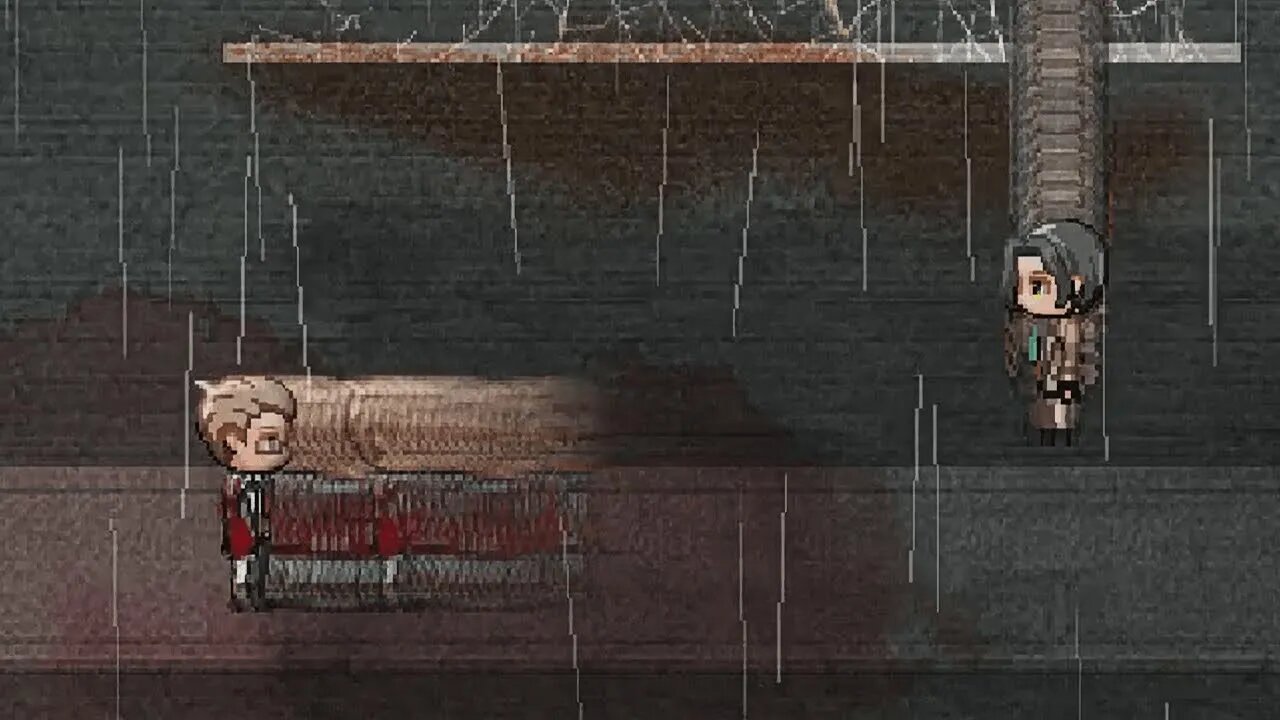
Plugging MV #25 After-Image Effect on Sprites & Events | Going Slow-mo
Discord Invite: https://discord.gg/hVVdm5Z
'Plugging MV' is a series where I showcase interesting (community-made) plugins for RPG Maker MV, as I discover them myself, while going through a list of 4000+ plugins.
#RPGMaker #Plugin #Cutscene
Plugging MV #25
Plugin:
SAN_ResidualSprites.js
This plugin allows us to add an after-image effect (or 'residual effect') to sprites and events.
Side note: Slowing down the weather in the video, was done using Cae_WeatherOpts.js which I brought up before in a previous video.
Programmer: Sanshiro
Tested on Version: 1.5.1
DOWNLOAD LINKS:
Direct download link:
https://raw.githubusercontent.com/rev2nym/SAN_ResidualSprites/master/js/plugins/SAN_ResidualSprites.js
Post Link:
https://github.com/rev2nym/SAN_ResidualSprites/blob/master/README.md
HOW TO:
Do note, there are only script commands in this plugin.
To apply the after-image effect on the player (i.e the main actor), use the following script:
$gamePlayer.residual().setValid(true);
...put 'false' instead of 'true', and that will cancel the effect.
To change the color of the effect, use:
$gamePlayer.residual().setColorTone([red, green, blue, gray]);
Here red, green, blue, and gray, can have any value from 0 to 255. So the script can look like:
$gamePlayer.residual().setColorTone([255, 000, 0, 0]);
...this will produce the afterimage effect in red.
To change the opacity, use:
$gamePlayer.residual().setOpacity(opacity);
...where 'opacity' can be anything from 0 to 255.
You can change how long each afterimage stays before fading out, using the following script:
$gamePlayer.residual().setDuration(duration);
...here, 'duration' can be any number of frames. Like 30 or 500.
You can also change after how many frames each afterimage is produced:
$gamePlayer.residual().setPeriod(period);
...here, 'period' can be any number of frames. Like 5 or 20.
Using all the above scripts, here's a complete example that you can copy paste in your project to check:
$gamePlayer.residual().setValid(true);
$gamePlayer.residual().setColorTone([0, 0, 0, 0]);
$gamePlayer.residual().setOpacity(100);
$gamePlayer.residual().setDuration(150);
$gamePlayer.residual().setPeriod(5);
...this will apply the effect to your main actor, with an afterimage being produce every 5 frames, having no color, and 100 opacity, with each image lasting around 150 frames.
To use the effect on an event, instead of your main actor,
replace '$gameplayer'
with '$gameMap.event(eventId)'.
here, 'eventId' is the ID of the event you want to apply the effect on.
So if we convert the above example script for an event with ID '12', it would look like:
$gameMap.event(12).residual().setValid(true);
$gameMap.event(12).residual().setColorTone([0, 0, 0, 0]);
$gameMap.event(12).residual().setOpacity(100);
$gameMap.event(12).residual().setDuration(150);
$gameMap.event(12).residual().setPeriod(5);
And to use the effect on a follower,
replace '$gameplayer'
with '$gamePlayer.followers().follower(index)'
here, if 'index' is '0', the effect will be applied to the second party member. And if 'index' is '1', it will applied to the third member. And so forth.
So if we convert the same example, but for the second party member, the script can look like:
$gamePlayer.followers().follower(0).residual().setValid(true);
$gamePlayer.followers().follower(0).setColorTone([0, 0, 0, 0]);
$gamePlayer.followers().follower(0).setOpacity(100);
$gamePlayer.followers().follower(0).setDuration(150);
$gamePlayer.followers().follower(0).setPeriod(5);`
Checkout the official instructions inside the plugin, to get an even better understanding.
SOME APPLICATIONS:
1- You can use this to show a difference in speed between characters on-screen.
2- Use it in trippy scenes.
3- Use this in slow-mo scenes.
4- If a particular item or button gives your character a walking speed boost for a bit, you could use this in that instance.
5- In a snake or tron-like minigame?
6- Create false walls. (Have events move around in the map, leaving an unending trail of after-images that function as walls or barriers.)
What other application do you guys have in mind for this after image effect? Do comment and share!
Spreadsheet Link:
https://docs.google.com/spreadsheets/d/1w2Zy5Gbp47ObutYiv7cU6DV82LK3reAncxM0weKR04Q/edit?usp=sharing
BGM Used in Video: by maoudamashii.jokersounds
https://maoudamashii.jokersounds.com/
YouTube Playlist:
https://www.youtube.com/playlist?list=PLalOiJrVKsOc_2PXrkigg3EpL3pvcljQO
(Would be ABSOLUTELY awesome as you subscribe to my YouTube channel & leave a like on the videos. :D And don't hesitate to leave your thoughts and suggestions in the comment!)
-
 10:45
10:45
MattMorseTV
17 hours ago $7.62 earnedThe Dems. just got NIGHTMARE NEWS.
9.89K47 -
 1:27:15
MetatronHistory
1 day agoShogun FX DEEP Historical Analysis
53 -
 LIVE
LIVE
DoldrumDan
6 hours agoSEKIRO FIRST PLAYTHROUGH - NIGHTREIGN - LONG STREAM - DLC DEPTH 5 - DAY 78 NEW LIFE
267 watching -
 3:33
3:33
SethDrums
19 hours ago $5.03 earnedMary Had A Little Lamb if it was in the 1980s
83.8K13 -
 LIVE
LIVE
Lofi Girl
3 years agolofi hip hop radio 📚 - beats to relax/study to
113 watching -
 LIVE
LIVE
EXPBLESS
2 hours agoHunt Showdown LIVE On Rumble!!
23 watching -
 LIVE
LIVE
FyrBorne
11 hours ago🔴Battlefield REDSEC Live M&K Gameplay: Abusing Engineer To Everyone's Despair
51 watching -
 14:12
14:12
MetatronHistory
6 days agoHow did the Romans build their Aqueducts?
2541 -
 2:00:54
TheSaltyCracker
12 hours agoSomali Fraud Explodes ReeEStream 12-26-25
575K411 -
 8:05:03
SpartakusLIVE
13 hours agoGames w/ Jessie || #1 HERO of the HOLIDAYS
46.3K7