Error Handling Methods in Excel VBA
You can download the workbook used in this video from the link below:
https://www.nomorelinesla.com/wp-content/uploads/2022/04/Excel-VBA-Error-Handling-Examples.zip
Error-handling is one of the most useful aspects of VBA, not just in Excel but also in other applications such as Outlook and Access. Error-handling allows you to capture and potentially correct an issue with your VBA code.
Anyone who has programmed in VBA has seen the Microsoft Visual Basic window appear when an error occurs executing code. For example, if your code selects a workbook that does not exist within the workbook collection, an Error 9 "Subscript Out of Range" error will appear in a message box. Without error-handling, this message box fatally terminates the subroutines/functions currently running.
Error-handling allows you to set aside code that help identify or fix a potential issue that can halt a critical process from executing. This is especially important for reliable automated reporting.
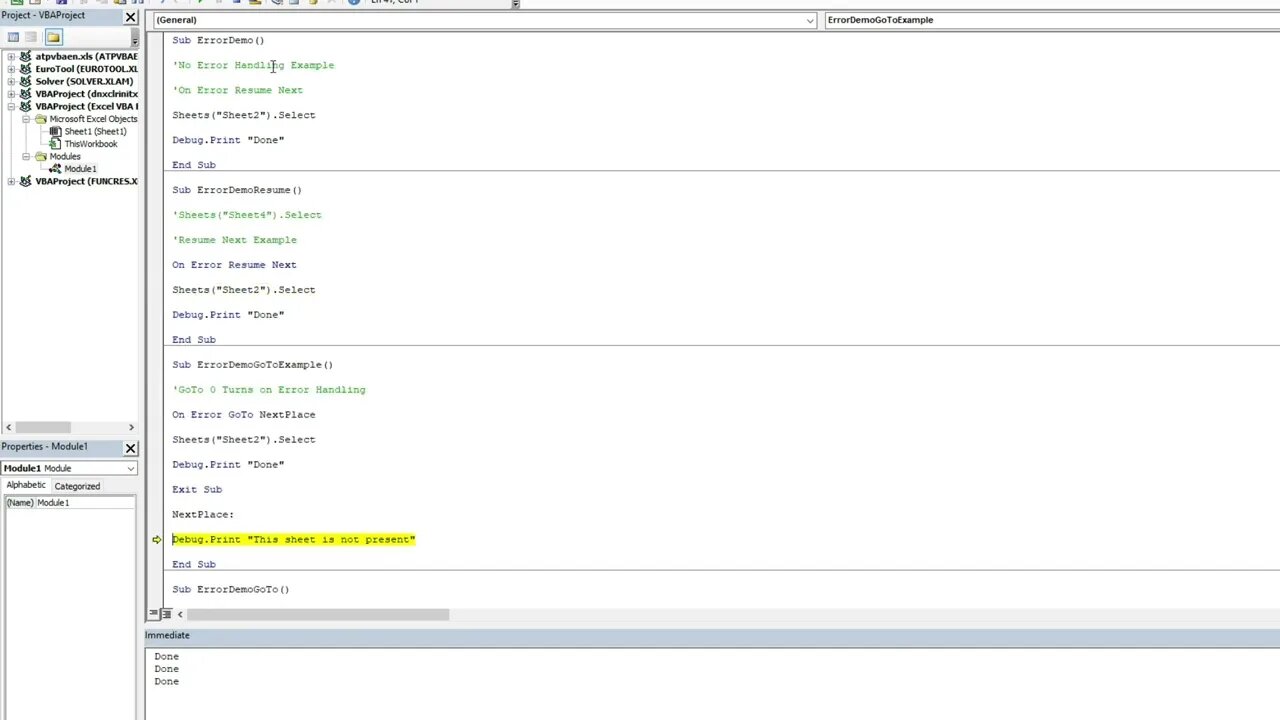
The first error handling option is called "On Error Resume Next". Think of the "On Error" line of code as a stoplight that instructs Excel on what to do when the next fatal error occurs. It does not apply to any preceding code. "On Error Resume Next" tells Excel to continue running the next step of the subroutine/function. As expected, this has benefits and determents and thought go into selecting the correct method of error-handling.
The next error-handling option is called "On Error GoTo". You can give a section of your code a heading, i.e., "On Error GoTo NextSection". "NextSection" with a colon (i.e. NextSection:) would then need to be present within your code. The "On Error GoTo" and your section heading would then divert your code to the "NextSection:" part of your code. It is recommended that you put your "On Error GoTo" error handling at the end of your code to prevent your error handling from running accidentially. A way of doing this is to type "Exit Sub" preceding your error-handling heading.
Lastly the final error-handling option is called "On Error GoTo 0". The main different between "On Error GoTo 0" and "On Error GoTo 'Heading'" is "On Error GoTo 0" is the off-switch to any On Errors currently enabled within the subroutine. Any code following "On Error GoTo 0" will throw a fatal error if an execution error occurs, nullifying any error-handling currently active.
Note: when the subroutine finishes, the error-handling deactivates.
-
 3:04:49
Price of Reason
11 hours agoTrump wants Tim Walz to RESIGN! Welcome to Derry Finale! Song Sung Blue EARLY REVIEW! Lanterns WOKE?
196K8 -
 11:47
11:47
Liberty Hangout
1 day agoAnti-Trump Beta FARTS On Me Instead of Debating
45.8K68 -
 1:37:20
FreshandFit
6 hours agoShe’s Not Your Girl It’s Just Your Turn
49.7K6 -
 5:26:18
Akademiks
8 hours agoEbro has MELTDOWN after Drake tells him to *** SLOWLY! Radio Over? NLE vs Youngboy part 805?
35.8K -
 1:35:27
Inverted World Live
9 hours agoLost Satellites, Wild Horses, and 3i/Atlas
149K6 -
 2:53:42
TimcastIRL
8 hours agoCandace Owens IMPLODES, Audience IN REVOLT, Claim SHES A CLONE Or GOT THE CALL | Timcast IRL
289K216 -
 2:49:53
Barry Cunningham
8 hours agoLIVE BREAKING NEWS: President Trump Celebrates Hanukkah! And More News
68.2K12 -
 1:29:40
Anthony Rogers
15 hours agoEpisode 394 - Isaac Butterfield
34.2K1 -
 8:02
8:02
China Uncensored
14 hours agoChina Just Took The First Step Towards WAR
43.6K23 -
 1:20:04
Flyover Conservatives
1 day agoWhy Did Jesus Really Come? It’s NOT What You Think - Pedro Adao | FOC Show
39.9K4