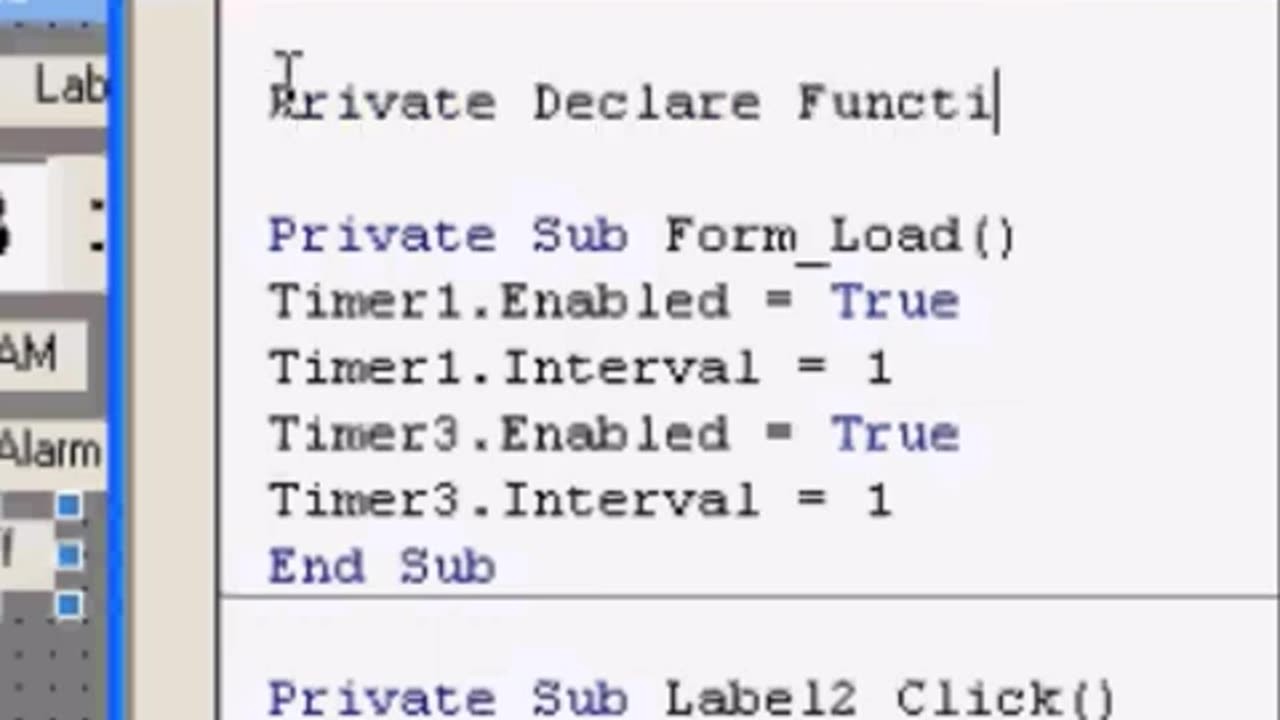
Learn Visual Basic 6 VB6 Alarm Clock Part 2
Welcome to part 2 of project 2 making a alarm clock ..
My name is Gym and today were going to be moving on with the coding part of our second project
Ok lets got on with it,, this line of code is only 1 of 2 most complicated lines in the whole program,, and ill try to explain to you what its saying.
If Time = (Text1.Text) & ":" & (Text2.Text) & ":00 " & (Text3.Text) Then
we use brackets because then it means the object text1..
if we used quotation marks then it means that exact thing written,, in other words it would only sound the alarm when the time read text1.text..
lol and I'm not shore what hr of the day that is..lol.
Ok after the then its timer4.enabled = true and timer4.intervull = the length of you wav file you have selected,, now remember that 1 second = 1000 so if you have file is 3 secs long you want the interval to be 3000.. to find out the leant of your wav file right mouse click then properties .
then finish i of with end if
Ok now in Timer 3 we want to right
if option1 ="1" then
Text3.text = "AM" 'in capitals
else
Text3.text = "PM" 'in capitals
Okays now in form load we need to have timer 3 switched on from load up so instead of typing it all out again just copy timer 1 enabled with interval and past it below and change t it from timer 1 to timer 3
Now we have to do the on and off button so in the on button we right timer2 enabled = true and then interval =1 and then we want the caption to change in our status label so we right label 2 caption = "Alarm is on" don't forget the quotations
Then in the off button we need it to say timer 2 enabled = false and then
Label 2 caption = "alarm is off"
and we also what to have that button to not only turn off the timer that tells wether the times mach we want to use it to turn off our wav file once it has sounded so we right timer4. Enable = false
Ok now here is the hardest bit of them all... we want to use the drop down box to find general and then make shore it sees dilacerations,,,
And in their we going to right
Private Declare Function Playwave Lib "winmm.dll" Alias "sndPlaySoundA" (ByVal lpszSoundName As String, ByVal uFlags As Long) As Long
Call Playwave("Alarm.WAV", 3)
-
 23:17
23:17
The Car Edition Ltd
7 hours agoFord Fiesta 1.4 Titanium Full Overhaul | Suspension, Brakes, Tyres & Engine Repair - The Car Edition
-
 LIVE
LIVE
Wendy Bell Radio
5 hours agoHouston, We Have A Problem
6,899 watching -
 1:06:37
Chad Prather
16 hours agoHearing God, Confronting Deception, and Walking in Spirit-Filled Authority
65.4K16 -
 LIVE
LIVE
LFA TV
6 hours agoLIVE & BREAKING NEWS! | FRIDAY 12/19/25
2,600 watching -
 2:20:42
Game On!
18 hours ago $4.40 earnedNFL Week 16 BEST BETS Revealed NOW!
28.8K6 -
 1:01:24
Crypto Power Hour
12 hours ago $3.21 earnedHow Crypto Address Poisoning Attacks Work
31.1K8 -
 9:03
9:03
Tactical Advisor
15 hours agoWhy You Should Get a Suppressor Before 2026
23.6K10 -
 17:47
17:47
Degenerate Jay
1 day ago $1.70 earnedThis Game Deserved 2025 Game Of The Year - Dispatch
20.1K1 -
 25:55
25:55
Welker Farms
20 hours ago $1.95 earnedI'd Say We Make A Pretty Good Team Fix'n These Tractors
25.1K3 -
 8:01
8:01
Gun Owners Of America
17 hours ago40+ Members of Congress Warn DOJ & ATF To Stop Defending the NFA!
22.2K6