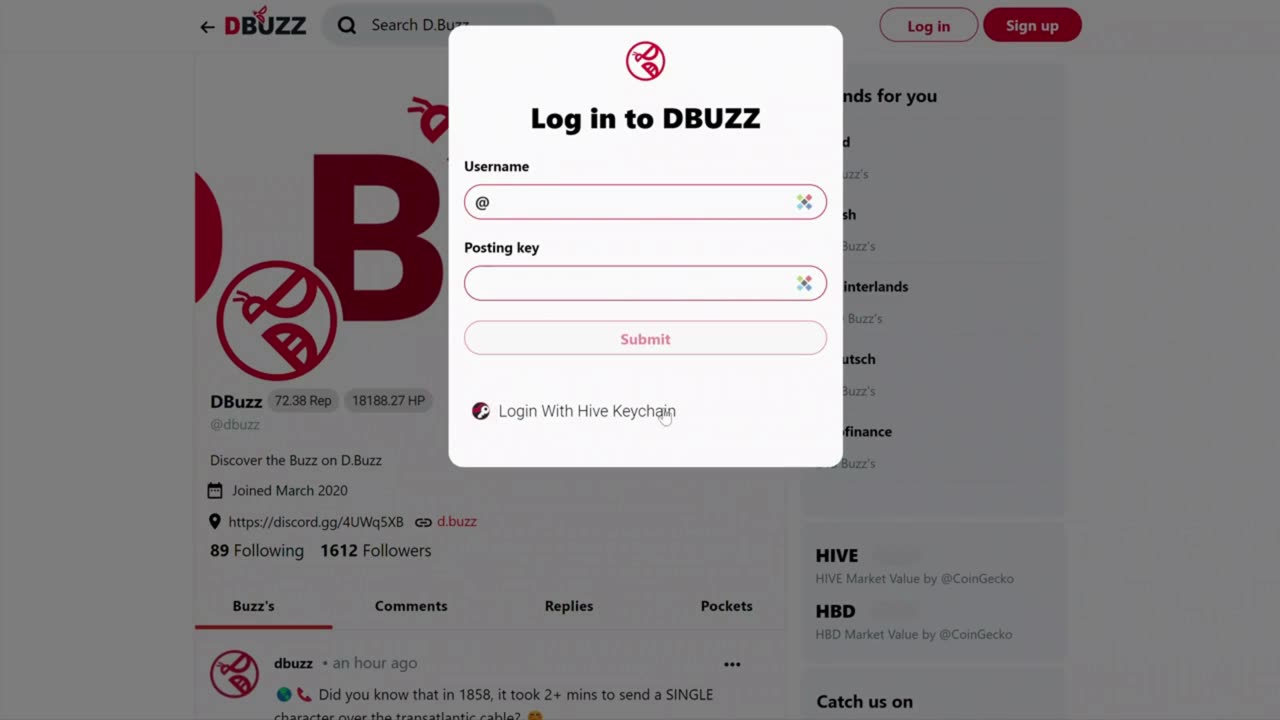
How to Login to D.Buzz
D.Buzz
https://d.buzz
1. In this tutorial, we'll walk you through the steps to log in to DBuzz on your desktop:
2. First, open a web browser and navigate to the D.Buzz homepage.
In the top left-hand corner of the page, you should see a "Log In" button.
3. Click the "Log In" button to proceed.
4. Next, enter your username in the designated field. Note that you don't need to include the "@" sign.
5. You have two options for logging in at this point:
- Option 1: If you have your posting key, enter it into the field provided. You would have received this key when you signed up for DBuzz.
- Option 2: Use the Hive Key Chain app if you've installed it in your browser. This is the recommended method for the most secure way to log in.
6. After you've selected your preferred login method, click the "Submit" button.
Congratulations - you're now logged in to DBuzz!
-
 0:56
0:56
D.Buzz | Free Speech Platform
2 years agoOnboarding users to Web3.
18 -
 LIVE
LIVE
The Chris Salcedo Show
18 hours agoHow Much More Will Americans Take?!
614 watching -
 1:29:47
LIVE WITH CHRIS'WORLD
11 hours agoTHE WAKE UP CALL - 12/01/2025 - Episode 15
5.82K2 -
 LIVE
LIVE
Game On!
14 hours agoUnderdogs WIN BIG In The NFL Week 13 Games!
265 watching -
 14:57
14:57
Upper Echelon Gamers
11 hours ago $1.83 earnedNot Even The Tech Bros Want Their Own Tech
15.8K1 -
 9:06
9:06
Adam Does Movies
14 hours ago $0.43 earnedKeeper - Movie Review
3.42K -
 1:22:24
Mike Mac - Say Something
14 hours agoSay Something Beyond W/MikeMac: JARED SILVER - Ep.16
4.47K1 -
 8:29
8:29
Freedom Frontline
15 hours agoEric Schmitt Plays One Charlie Kirk Clip And Democrats Panic Instantly
3.69K5 -
 LIVE
LIVE
BEK TV
2 days agoTrent Loos in the Morning - 12/01/2025
217 watching -
 LIVE
LIVE
The Bubba Army
4 days agoTRUMP IGNITES NEW CONFLICT with VENEZUELA - Bubba the Love Sponge® Show | 12/01/25
1,525 watching