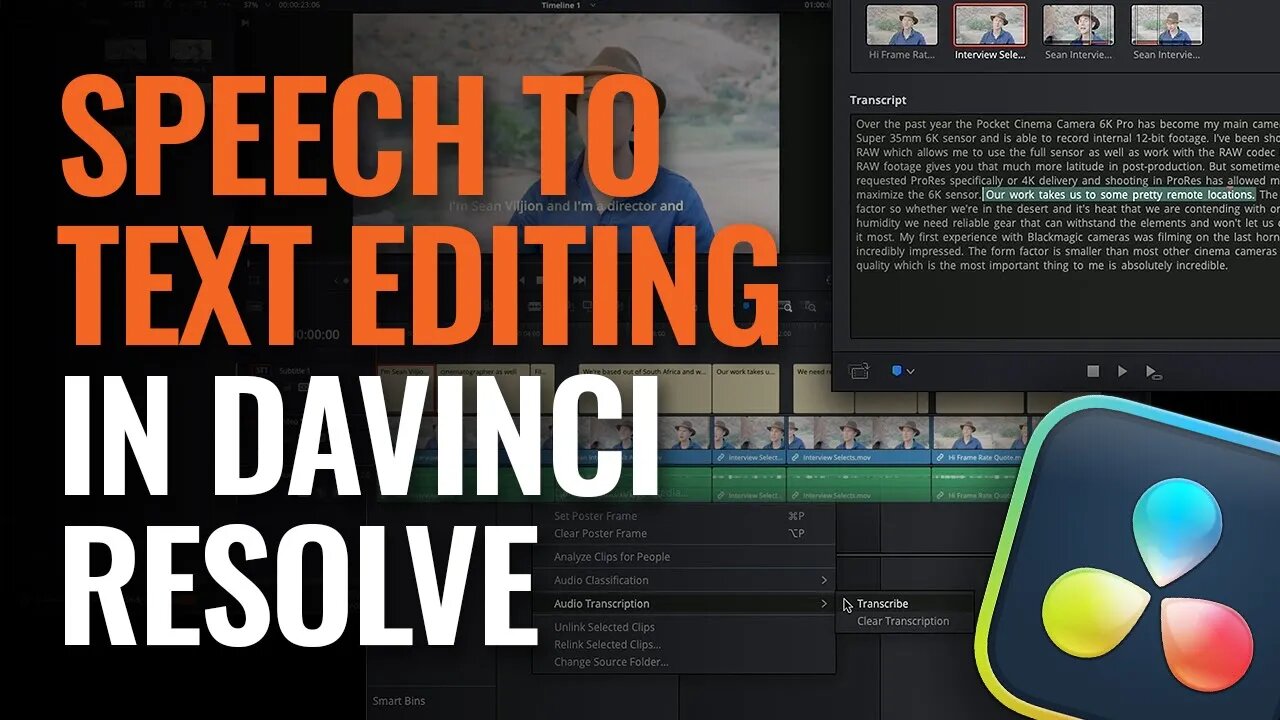
Speech to Text Editing in DaVinci Resolve
2 years ago
71
Learn how to quickly generate captions for timelines with auto speech to text. You can also search for specific terms or jump to the section of a clip where a word appears and add that section to your timeline.
The latest version of DaVinci Resolve can be downloaded from https://www.blackmagicdesign.com/products/davinciresolve.
Loading comments...
-
 3:09:23
BlackmagicDesign
10 months ago $0.02 earnedNAB 2025 Update
421 -
 3:48
3:48
RidiculousRides
1 day ago $0.79 earnedThe World’s Most Expensive Motorhome: Inside The $3M Marchi Element SV
4.86K5 -
 LIVE
LIVE
Charlotte Winslow
16 minutes agoMidna plays Legend of Zelda: Twilight Princess at City in the Sky! with Voice Acting
6 watching -
 14:48
14:48
WhatCulture - Film
4 days ago $0.46 earned10 Movies That Just Got Cancelled
4.77K2 -
 LIVE
LIVE
Midnightgreen20
1 hour agoTekken 8 | Leveling Up with Raven
20 watching -
 10:52
10:52
WhatCulture Gaming
2 days ago $0.07 earnedThe Perfect Game DOES Exist
3.11K1 -
 1:50:43
iCkEdMeL
3 hours ago $5.10 earnedTrump Bombshell: 'Very Strong Clues' & Possible Suspect ID'd in Nancy Guthrie Kidnapping!
16.9K14 -
 LIVE
LIVE
FrizzleMcDizzle
2 hours ago $0.97 earnedSoloing in nightreign - New emotes
131 watching -
 11:02
11:02
WhatCulture Horror
1 day ago $0.16 earned10 MORE Horror Movies Where The Victim Is More Dangerous Than The Villain
4.36K2 -
 6:25
6:25
Who What Wear
3 days agoCharli XCX's Stylist Breaks Down Her BRAT Fashion Era | Behind The Looks | Who What Wear
2.67K