PROA7 or PROA7PLUS - Resetting the Installer Code
In this video, John from Alarm Grid shows you how to edit the Installer Code in a Resideo/Honeywell Home PROA7 or PROA7PLUS alarm panel. To do this, you will need to know the current Installer Code. Alarm Grid usually recommends that you leave the Installer Code set to the default. This is because if you forget the Installer Code, there is no back door into programming. A monitored panel can be edited using the AlarmNet360 page, but an unmonitored panel with an unknown Installer Code can't be programmed. The Installer Code cannot disarm the panel if it has been quick-armed, or armed with any other user code.
To edit the Installer Code, from the Home Screen of the panel, press the hamburger menu icon in the bottom-center of the screen. This will bring up a list of menu options including Favorites, Devices, Sensors, Cameras, Scenes, Events, Settings, Tools, and Help. To see all of the options, you will. need to place your finger on the list and slide up to scroll through it. To change the Installer Code, scroll toward the bottom and select Tools. When prompted, enter the current Installer Code. The default is 4112.
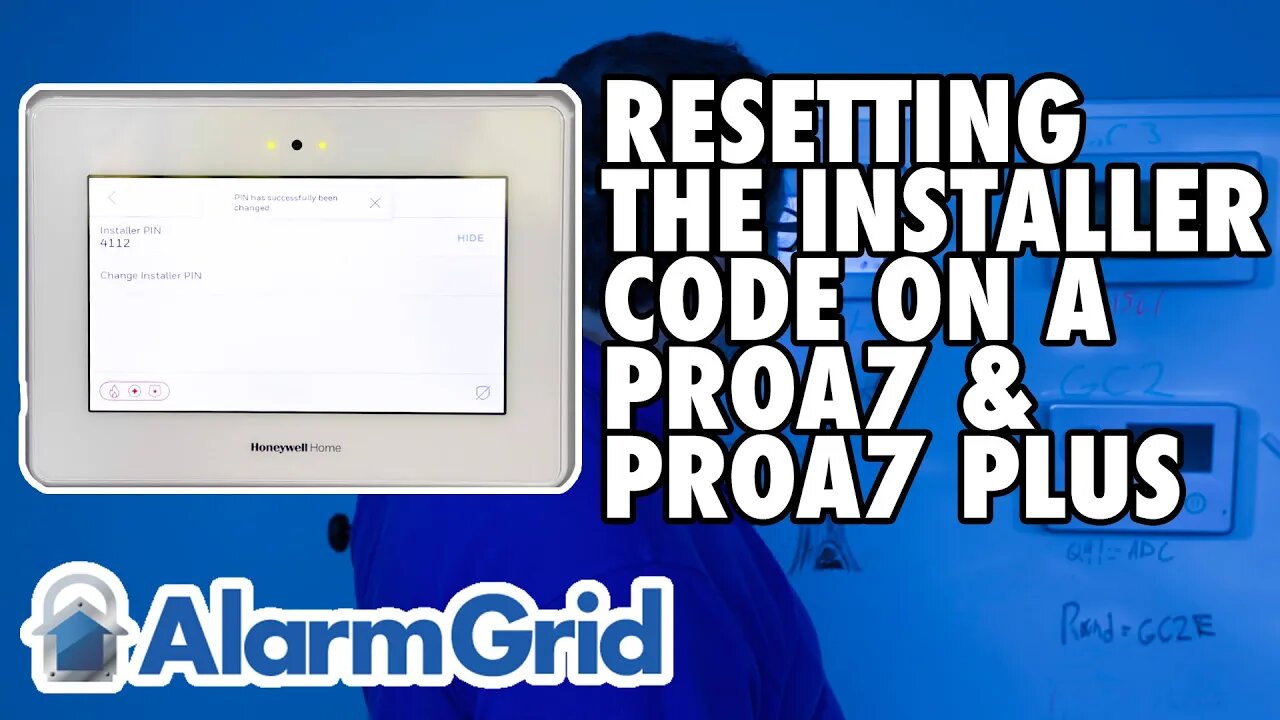
This will bring you to the Installer's Menu. Here you'll see System Information, System Tests, Programming, Local Alarm Mode, WIFI Touchscreen enrollment, Installer PIN, and Default Options. Once again, you'll have to scroll up and down with your finger to see all of the available choices. Tap the Installer PIN option. This will bring you to the screen where you can review the current Installer PIN, or change it. By default, the 4-digit PIN is hidden. There is a "SHOW" button to the right that you can click to review the current PIN. Of course, you know what that PIN is because you had to use it to get to this screen.
Press Change Installer PIN. You'll be provided with a number pad and asked to "Enter new PIN". Once you key in the new 4-digit PIN, you'll be asked to "Confirm new PIN". Enter the same 4-digit PIN again. You'll be returned to the previous screen and a message will show at the top advising that the "PIN has successfully been changed". Press the left-arrow button in the upper left of the screen repeatedly until you return to the home screen.
https://www.alarmgrid.com/faq/how-do-i-reset-the-installer-code-on-a-proa7-or-proa7plus
-
 4:37
4:37
Alarm Grid Home Security DIY Videos
2 years agoQolsys IQ Panel 4: Change the Master Code
35 -

FreshandFit
4 hours agoAfter Hours w/ Girls
95.1K50 -
 3:05:53
Decoy
5 hours agoNobody is talking about this..
61.7K7 -
 1:57:00
Badlands Media
11 hours agoBaseless Conspiracies Ep. 163
41.7K6 -
 LIVE
LIVE
Drew Hernandez
23 hours agoERIKA KIRK / CANDACE OWENS CEASEFIRE SUMMIT & BACK TO BACK MASS SHOOTINGS?
1,273 watching -
 1:37:33
efenigson
13 hours agoUnapologetically Yourself: The Courage to Speak & Be Different - Zuby | Ep. 111
20.1K2 -
 1:07:27
Inverted World Live
4 hours agoAI Person of the Year & Robot Wolves in Japan | Ep. 153
57.7K4 -
 3:03:11
TimcastIRL
5 hours agoRob Reiner MURDERED, Son Arrested, Trump Faces Backlash Over Comments | Timcast IRL
246K131 -
![ON THE SUBJECT: Top Christmas Movies That Raised Millennials [Part 1]](https://1a-1791.com/video/fww1/d4/s8/1/M/E/t/I/MEtIz.0kob-small-ON-THE-SUBJECT-Top-Christma.jpg) 1:46:20
1:46:20
megimu32
4 hours agoON THE SUBJECT: Top Christmas Movies That Raised Millennials [Part 1]
34.1K7 -
 57:22
57:22
Flyover Conservatives
1 day agoChina and India are Draining Silver — Prices Are Responding Fast - Dr. Kirk Elliott; Natural Remedy You Don't Know About - Dr. Troy Spurrill | FOC Show
32.9K1