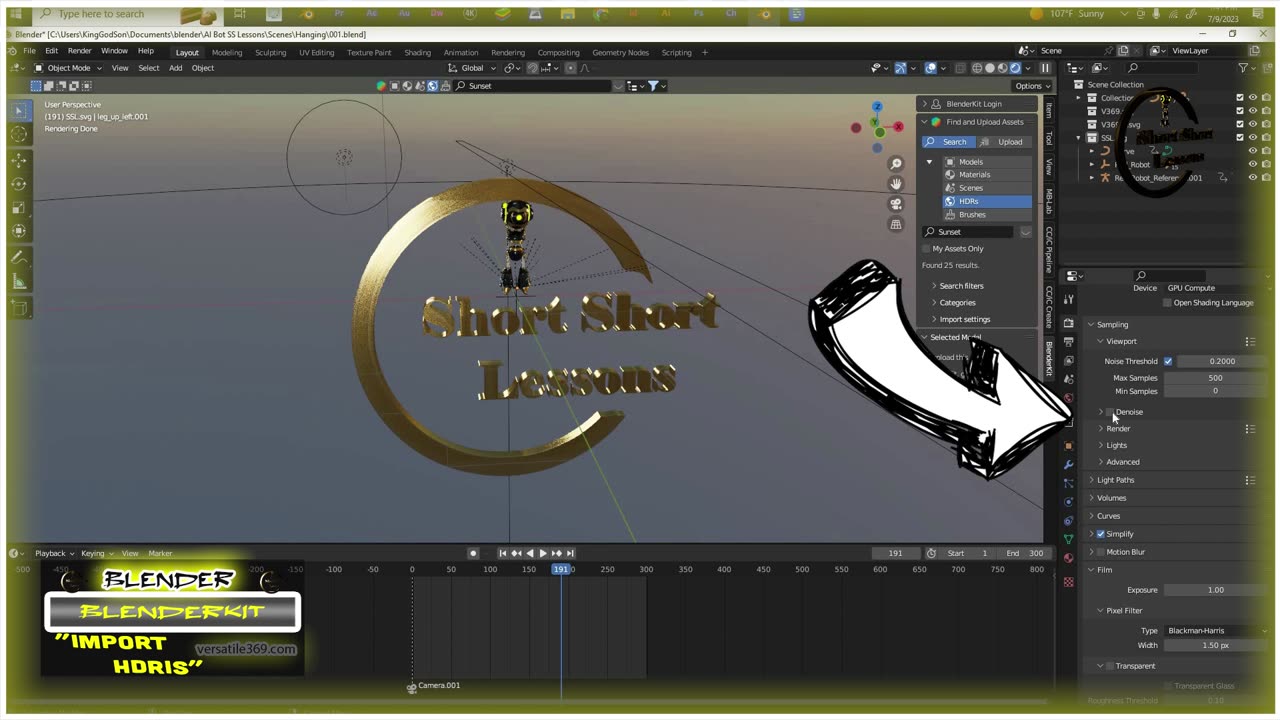
FREE HDRI Blender, BlenderKit SSL 2023
To import HDRIs from BlenderKit into Blender, you can follow these steps:
1. Search for HDRIs: In the BlenderKit panel,
2. Click on the eye to view the HDRIs in the library, and search for your desired environment texture.
3. Once selected, you can drag and drop the HDRIs into the background.
4. Go to Render tab/viewport and select “De-noise”.
5. Customize and adjust the HDRI effect by clicking on the World Properties
and raising the strength value to achieve the desired look for your objects.
By following these steps, you should be able to import HDRIs from BlenderKit into Blender and apply custom lighting to enhance the visual appearance of your 3D projects.
Locked items cannot be used with the free version and are for paid version only.
That's it! You can now import HDRIs free quick and easy. Remember to respect the licensing terms and conditions associated with each model you download and use.
Thanks for watching.
Please Like. Share. and. Subscribe for more Short Short Lessons
#Blender #BlenderKits #Free3D #3D #free #HDRIs #ssl #shortshortlessons #quicktips
-
 13:46
13:46
Actual Justice Warrior
16 hours agoBrandon Johnson Embarrasses Chicago
2.37K11 -
 1:04:47
Coin Stories with Natalie Brunell
18 hours agoCem Karsan: Why the Dollar’s Power Matters More Than Gold or Bitcoin
8.17K1 -
 32:34
32:34
Code Blue Cam
1 day agoHow a Perfect Wedding Night Turned Into Complete Disaster
6.21K4 -
 4:05:17
SethDrums
13 hours agoLIVE DRUMS ON RUMBLE
6.9K1 -
 14:07
14:07
MattMorseTV
13 hours ago $12.29 earnedNoem just went NUCLEAR.
58.4K86 -
 17:59
17:59
Nikko Ortiz
1 day agoKaren Learns A Lesson...
33.8K15 -
 2:17:09
Side Scrollers Podcast
19 hours agoSide Scrollers Podcast Live | Thursday January 22, 2026
50.9K10 -
 15:00
15:00
MetatronHistory
5 days agoWhy did samurai wear masks?
7.32K2 -
 LIVE
LIVE
Lofi Girl
3 years agolofi hip hop radio 📚 - beats to relax/study to
790 watching -
 1:02:02
Sam Tripoli
4 days ago $1.15 earnedCash Daddies #151: Live Tuesday @ 10am pst
15K4