Parental Controls for IPTV Smarter on Fire Stick
Learn how to set up and manage parental controls on IPTV Smarter using your Amazon Fire Stick. This step-by-step guide will help you secure and control the content accessible through your IPTV service, ensuring a safe viewing environment for all users. Follow along as we navigate through the settings and enable parental controls.
Steps:
From the Home Screen:
Navigate to Settings found at the top right corner of the Home screen and click on it with your remote select button to open.
From the Settings Menu:
Navigate in Settings and find Parental Controls and click on it with your remote select button to open.
Parental Control Password:
A “Parental Password” rectangle input bar will show up to input the Pin password 1111. Proceed to click on submit with your remote select button to open the next screen.
If you are using a Fire Stick, an additional screen will show up for you to input the Pin password (only for Fire Sticks). See the next screen for assistance.
Parental Control Password Input Screen for Fire TV:
A password input screen provided by the Fire TV will show up. It is a square shape with a Ring that represents the ring on your Fire TV remote.
The password for Parental control is 1111. Using the clock ray method, the number 1 is located at the 12 o'clock (noon) position on the ring. So click the 12 o'clock position 4x to input 1111.
Click the return button to exit this screen and go back to the rectangle input bar.
Back at the Parental Control Password Once Again:
4 dots will show up in the rectangle input bar. Click on Submit with your remote select button to access Parental Control.
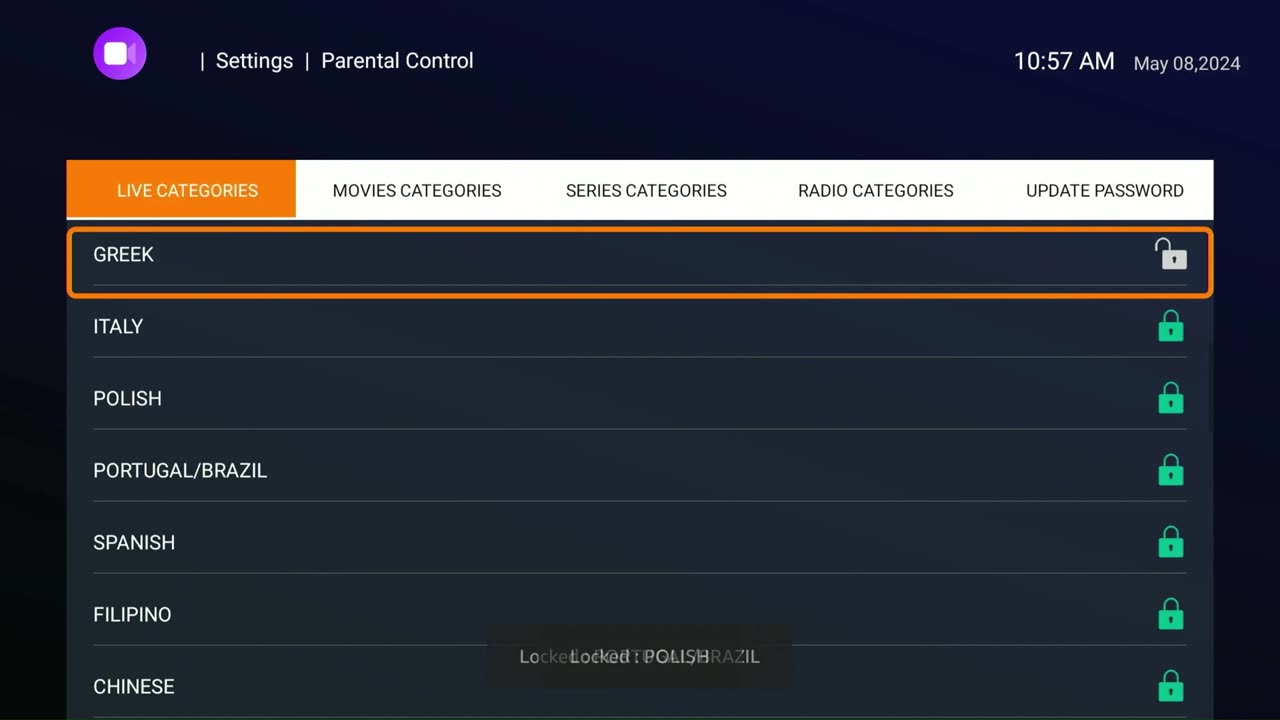
Parental Control Lock or Unlock:
Scroll down the list of Live TV Categories until you find what you are looking for. A White lock represents a Category that is Open (unlocked), and a Green Lock represents a Category that is closed (locked).
Click your remote select button to open or close access to Live TV categories.
Once your task is completed, click back on the Remote return button until you are back at the IPTV home screen or exit the application entirely.
For detailed instructions and visual guidance, please refer to the video.
-
 11:10
11:10
GreenMan Studio
13 hours agoTHE RUMBLE COLLAB SHOW – 2025 YEAR IN REVIEW w/ GreenMan Reports
3.14K1 -
 LIVE
LIVE
Midnight In The Mountains™
40 minutes agoMorning Coffee w/ Midnight & The Early Birds of Rumble | God Like Updates!
48 watching -
 LIVE
LIVE
Lofi Girl
3 years agolofi hip hop radio 📚 - beats to relax/study to
139 watching -
 8:04
8:04
Hollywood Exposed
12 hours agoKISS Singer DESTROYS Reporter Over Anti-Trump Question
1.95K7 -
 2:13:57
Badlands Media
1 day agoDevolution Power Hour Ep. 419: Fraud Fatigue and the Illusion of Permission
384K23 -
 56:04
56:04
Man in America
12 hours agoChina Just Broke the Banking Cartel’s Grip on Silver — Is the Reset Entering Its Finale?
77.3K46 -
 1:31:48
Tundra Tactical
15 hours ago $17.81 earned🚨🚨 Live At 9 pm : 5 Years And Over 400 Episodes What Should We Do Next? Favorite Kit Of The Year
52.4K4 -
 10:20:57
SpartakusLIVE
13 hours agoGames w/ StevieT || HERDS of NERDS Flock to the #1 King of Content
238K16 -
 10:37
10:37
MattMorseTV
16 hours ago $26.20 earnedThe Dems. just got BRUTAL NEWS.
70.5K92 -
 3:26:45
megimu32
15 hours agoOFF THE SUBJECT: BODYCAMS + BLITZ BATTLES ⚡
44.6K22