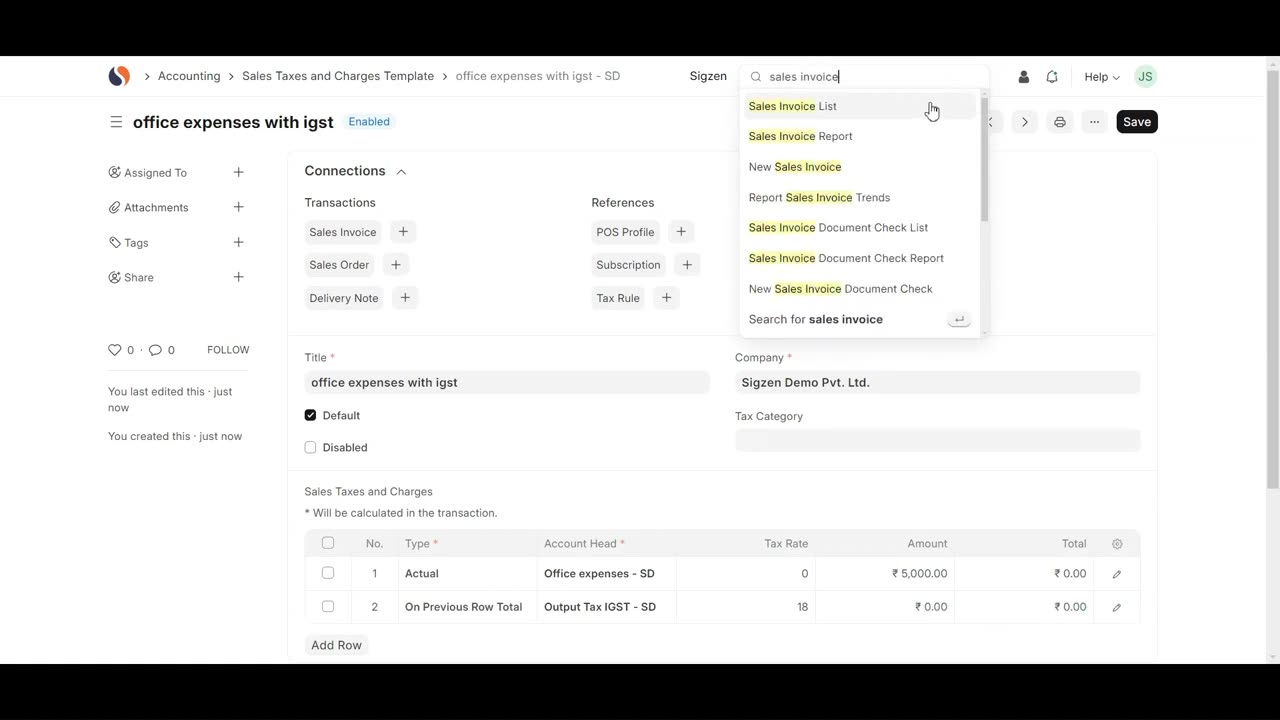
SigzenERP - Setup Sales & Purchase Taxes in ERPNext | Powered By: ERPNext-15
Welcome to the Sigzen ERP Tutorial on Configuring Sales and Purchase Taxes in ERPNext! This video is ideal for both beginners and experienced users looking to streamline their tax configuration process within the ERP system. Follow along as we walk you through the essential steps to set up and manage sales and purchase taxes efficiently.
In This Tutorial, You'll Learn:
Configuring Sales Taxes:
Navigating to Sales Taxes and Charges Template:
- Learn how to find the Sales Taxes and Charges Template using the search bar.
Adding Sales Taxes and Charges:
- Step-by-step instructions on creating a new sales tax template and setting it as default.
Setting Tax Details:
- Understand how to add rows for different tax details, including type, account head, rate, amount, and total.
Saving and Applying Tax Templates:
- How to save your configuration and apply the sales tax template to a sales invoice.
Configuring Purchase Taxes:
Navigating to Purchase Taxes and Charges Template:
- Discover how to locate the Purchase Taxes and Charges Template via the search bar.
Adding Purchase Taxes and Charges:
- Detailed steps for creating a new purchase tax template and marking it as default.
Setting Tax Details:
- Learn how to input tax details such as type, account head, rate, amount, and total.
Saving and Applying Tax Templates:
- Instructions on saving your setup and applying the purchase tax template to a purchase invoice.
Setting Up Tax Rules:
Navigating to Tax Rule List:
- Find out how to access the Tax Rule List and configure tax rules.
Configuring Tax Rules:
- Set the tax type (Sales or Purchase), select the tax template, and define customer groups and tax categories.
**Saving Tax Rules:**
- How to save your tax rule configurations and ensure they are valid.
Key Features Highlighted:
Efficient Tax Management:
- Seamlessly navigate and manage sales and purchase taxes within ERPNext.
Automated Tax Application:
- Simplify tax application with automated processes for sales and purchase invoices.
Comprehensive Configuration:
- Detailed guidance on configuring necessary tax details for accurate financial management.
Flexibility and Precision:
- Flexible options for setting default templates and specific tax rules for different customer groups.
Why Watch?
This step-by-step guide is designed to help you optimize the tax configuration functionality in Sigzen ERP. By following detailed instructions and practical examples, you’ll ensure accurate tax management and compliance, enhancing your overall financial operations.
If you have any questions, leave them in the comments below. Don't forget to like, share, and subscribe for more ERP tutorials tailored to your business needs. Happy tax configuring!
-
 4:21
4:21
SethDrums
4 days ago50 Cent - In Da Club if it was 1950s
12.2K3 -
 1:48:49
Badlands Media
15 hours agoDevolution Power Hour Ep. 416: The Rug Pull Cycle, False Signals & Narrative Discipline
370K44 -
 1:06:11
Inverted World Live
14 hours agoA Ghost Ship in Washington, A Fire in Roswell | Ep. 155
77.8K14 -
 3:06:55
TimcastIRL
10 hours agoDan Bongino To RESIGN, Trump Addresses The Nation
368K551 -
 2:14:08
Barry Cunningham
10 hours agoLIVE BREAKING NEWS: President Trump Addresses The Nation! And More News!
66.1K30 -
 5:15:27
ThatStarWarsGirl
12 hours agoTSWG LIVE: Discussing STAR WARS News with Special Guest Star Wars Theory!
52.1K5 -
 2:42:40
Laura Loomer
10 hours agoEP162: LIVE: President Trump Addresses The Nation
66.7K33 -
 1:32:05
Adam Does Movies
15 hours ago $12.45 earnedRob Reiner Films + Movie News + AMA - Live!
46.9K2 -
 47:57
47:57
Professor Nez
14 hours ago🚨LIVE NOW: President Trump Addresses the Nation from the Oval Office
47.5K42 -
 28:17
28:17
The White House
10 hours agoPresident Trump Delivers an Address to the Nation
122K165