SigzenERP - The Ultimate Guide to Flawless Purchase and Sales Returns in ERP
Welcome to the Sigzen ERP Tutorial on Creating Purchase and Sales Returns! This video is essential for both new and experienced users looking to streamline their return processes within the ERP system. This tutorial will walk you through the steps of creating purchase and sales returns to ensure accurate inventory and financial records.
In This Tutorial, You'll Learn:
Creating a Sales Return:
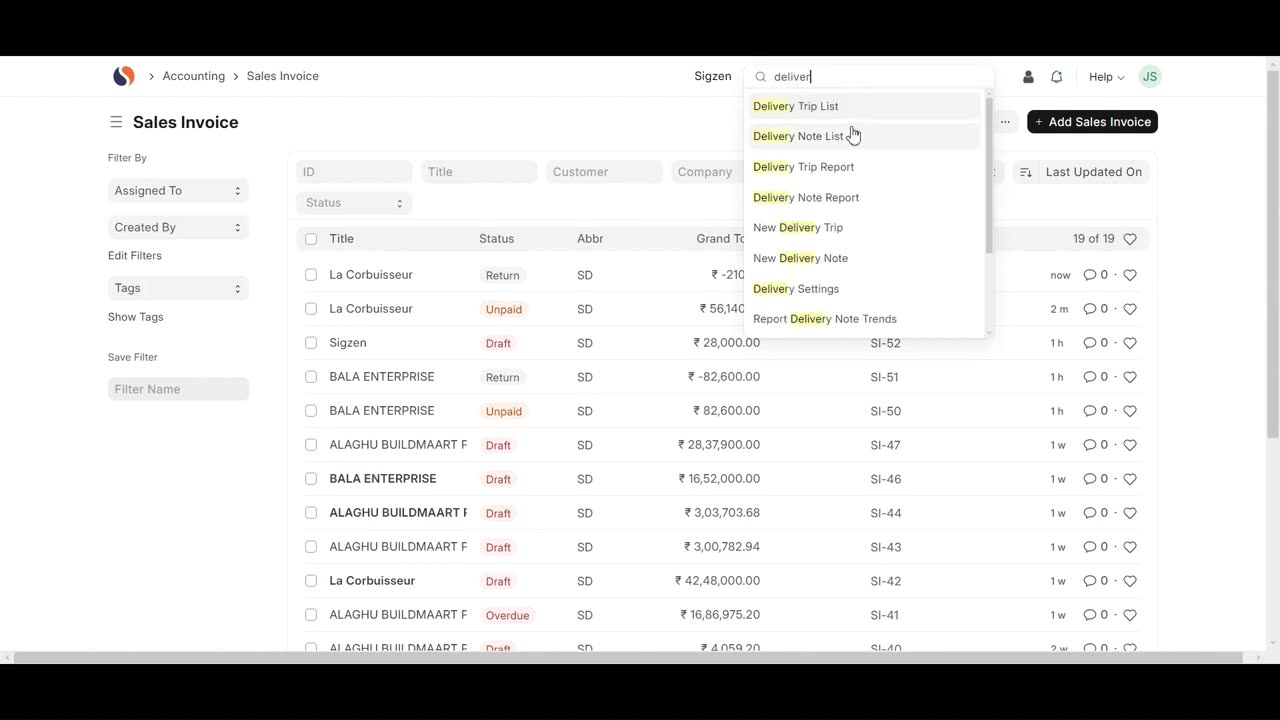
Navigating to Sales Invoice List: Learn how to access the Sales Invoice List by searching in the awesome bar.
Generating a Sales Return from Sales Invoices: Step-by-step instructions to create a sales return from an existing sales invoice.
Adding Item Details: Detailed guidance on setting the item, quantity, rate, and amount.
Submitting the Sales Return: Learn the process to save and submit the sales return.
Linking to Delivery Note: Understand how to link the sales return to a delivery note and navigate to the stock ledger.
Creating a Purchase Return:
Navigating to Purchase Receipt List: Learn how to access the Purchase Receipt List by searching in the awesome bar.
Generating a Purchase Return from Purchase Receipts: Step-by-step instructions to create a purchase return from an existing purchase receipt.
Adding Supplier and Item Details: Detailed guidance on setting the supplier name, item code, accepted and rejected quantities, rate, and amount.
Submitting the Purchase Return: Learn the process to save and submit the purchase return.
Linking to Stock and Accounting Ledger: Understand how to navigate to the stock and accounting ledgers.
Key Features Highlighted:
Efficient Return Management: Seamlessly navigate and manage purchase and sales returns within the ERP system.
Detailed Guidance: Comprehensive instructions on adding necessary details for accurate return processing.
Automated Calculations: Simplified automatic calculations for quantities and amounts.
Linking and Tracking: Easy tracking of returns linked to sales invoices and delivery notes.
Why Watch?
This step-by-step guide is designed to help you maximize the efficiency of the return functionality in Sigzen ERP. By following detailed instructions and practical examples, you'll enhance your inventory and financial management, ensuring accurate and smooth return processes.
If you have any questions, leave them in the comments below. Don't forget to like, share, and subscribe for more ERP tutorials tailored to your business needs. Happy returning!
Let’s connect online:
Instagram- https://www.instagram.com/sigzen.tech/
Facebook- https://www.facebook.com/sigzen/
LinkedIn- https://www.linkedin.com/company/sigzentechnologies/
-
 28:17
28:17
The White House
5 hours agoPresident Trump Delivers an Address to the Nation
66.4K114 -
 LIVE
LIVE
Drew Hernandez
22 hours agoTRUMP ADDRESSES THE NATION & BONGINO ANNOUNCES FBI DEPARTURE?
1,001 watching -
 2:37:30
Badlands Media
16 hours agoBadlands Media Special Coverage - MY FELLOW AMERICANS the Alpha Warrior Show & Redpill Project
59.6K25 -
 22:54
22:54
Jasmin Laine
11 hours agoMedia MELTS DOWN as Poilievre Surges—Ottawa Loses Control of the Narrative
27.8K14 -
 59:50
59:50
BonginoReport
8 hours agoDan Bongino Is Leaving The FBI - Nightly Scroll w/ Hayley Caronia (Ep.199)
286K250 -
 1:14:51
Kim Iversen
9 hours agoSTILL SHADY: Candace Meets With Erika — She Was Right
167K254 -
 1:04:57
Candace Owens
9 hours agoBREAKING NEWS! We Received Photos Of Charlie's Car After The Assassination. | Candace Ep 281
170K506 -
 1:42:25
Redacted News
9 hours agoPutin just did the UNTHINKABLE as US Senators push for war against Russia
178K170 -
 LIVE
LIVE
SpartakusLIVE
1 day agoWZ All Night! || Arc has been UNINSTALLED
139 watching -
 8:32
8:32
Dr. Nick Zyrowski
4 days agoHow Your Butt Shape Determine Metabolic Health - (Surprising Research!)
55.7K15