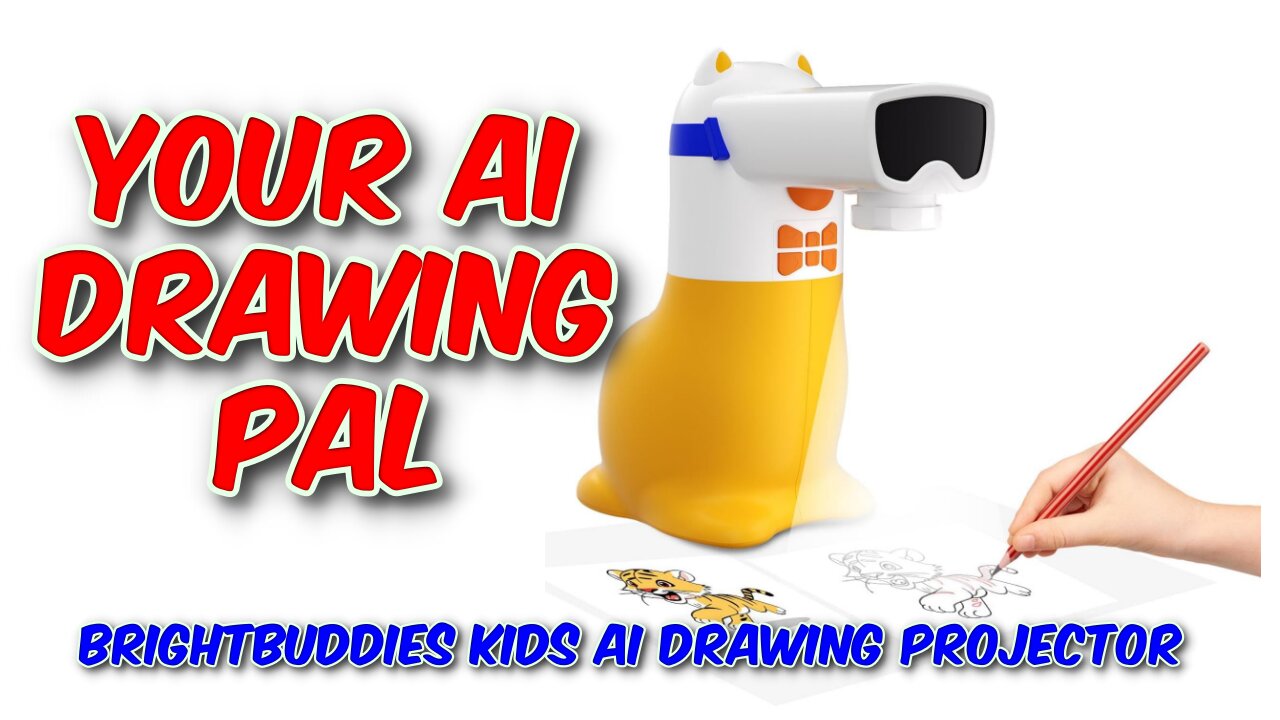
BrightBuddies Kids AI Drawing Projector Review
BrightBuddies Kids AI Drawing Projector Review
https://youtu.be/xTmYFeComJU
More Info and Purchase: https://t.ly/j1ksn
Buy Me A Coffee: https://www.buymeacoffee.com/marcoscu6
Blog: https://marcoscucom.wordpress.com/2025/08/11/brightbuddies-kids-ai-drawing-projector/
When I was in school many years ago, in art class, we used a device called an epidiascope as a drawing aid. It projected a picture or drawing onto the desk, allowing the user to trace over the projected image to make a copy. This new device from BrightBuddies updates that concept and takes it several stages further. This new device is based around an app which downloads images from the web or your phone and displays them onto a paper placed in front of it. It even allows the user to input a written description of an image, which it then generates using AI technology for you to trace over. The device has a colourful and striking appearance, clearly aimed at the preschool market, but it does have some very grown up tech inside it.
In the box, I received the base unit, projector head, rear panel, USB-C power cable and a well written and informative user guide. The build is lightweight, as you would expect for a child orientated product, but seems well made and nicely designed. It features large child friendly buttons - the basic functions unit can be controlled from the device itself in addition to the app, and a USB-C power in port on the rear. I was pleased to see that a standard USB-C cable is used, so no worries about losing it.
The Unit features a control panel on the front under the projection lens with a small number of large child friendly, but unlabelled buttons. Once the images you want are downloaded to the projector, the on-device controls are all you need. If needed, you can rotate the lens ring to focus manually, but once set, you should not need to touch it again.
After downloading the BrightBuddies app, you need to register it and can then download images from the internet and from your phone's library or even directly from the camera. You can even use AI through the app to generate images from your own description, and this works surprisingly well. However, right out of the box, there are over 100 sketching and learning features already installed.
The app helps youngsters learn to draw and colour by selecting and removing sections of the preset images and optionally showing just the bare outlines, making tracing easier. There is also a spoken word audio option and learning tools for cursive handwriting and English language development.
Don't let appearances fool you, this is a surprisingly sophisticated piece of kit that can entertain and educate your younger children. Currently priced at £89 after discounts, this is not cheap but does have a great deal to offer.
Music: YouTube Audio Library: Look Both Ways - Nathan Moore
-
 26:03
26:03
GritsGG
12 hours agoWarzone Brought Back This Over Powered Item! Daily Warzone Tips! #warzone=
25 -
 LIVE
LIVE
Lofi Girl
3 years agolofi hip hop radio 📚 - beats to relax/study to
904 watching -
 3:08:01
Badlands Media
13 hours agoDEFCON ZERQ Ep. 021: General Flynn - Military Is The Only Way
275K39 -
 3:00:33
TimcastIRL
7 hours agoCandace Owens Says MILITARY INVOLVED In Kirk Killing, Says Tim Pool's Brother Tried To SHOOT HIM
299K338 -
 2:47:33
Laura Loomer
7 hours agoEP160: THE UNITED STATES OF QATAR
60.2K36 -
 4:46:47
Drew Hernandez
1 day agoPRESIDENT TRUMP CONTINUES TO CLASH WITH MTG?
48.1K23 -
 21:46
21:46
Stephen Gardner
8 hours ago🟢YES! HUGE TRUMP NEWS TODAY!!
42.9K107 -
 6:20:28
SpartakusLIVE
9 hours agoAim Assist NERFED - I LOVE IT || #1 Spartan Solo Session
45.7K7 -
 55:59
55:59
Adam Does Movies
14 hours ago $4.36 earnedBest Sci-Fi Movies! - Live
35.9K3 -
 54:09
54:09
Patriots With Grit
5 hours agoWoke's Destruction of Men | Dr. Gilda Carle
27.6K6