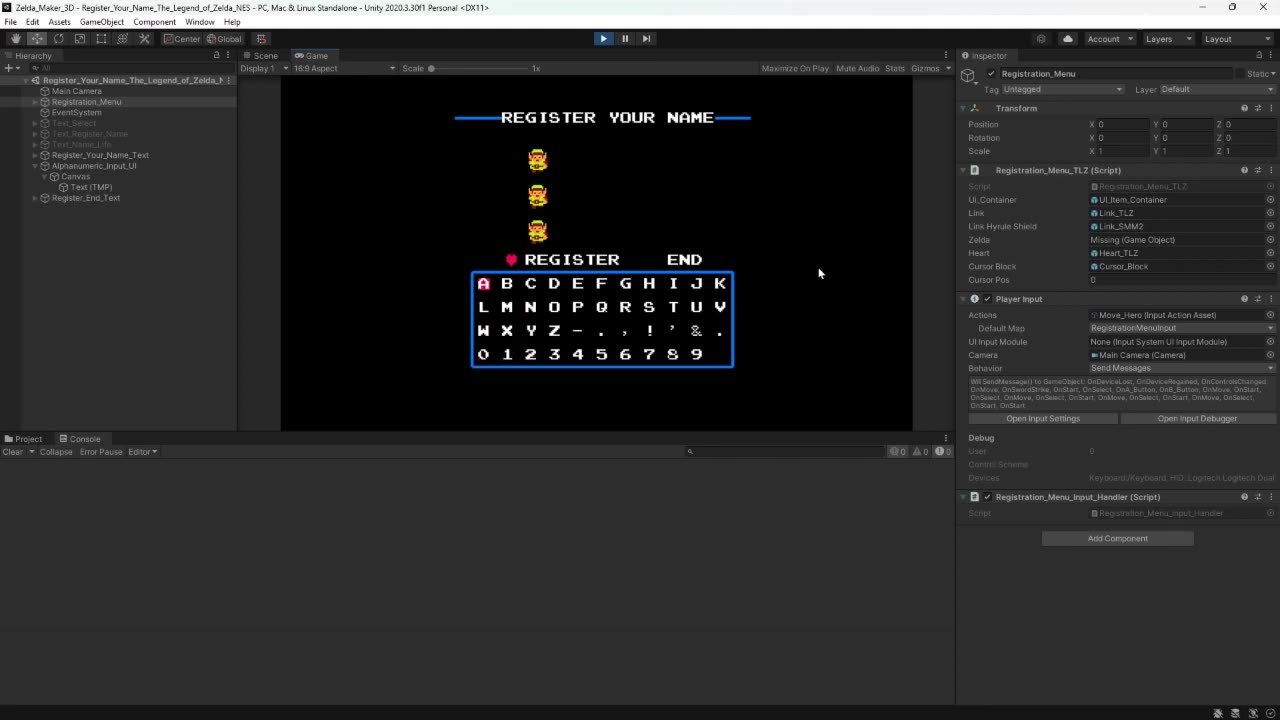
Moving the Cursor
Now I have to program this to add the selected characters to a string.
Then make that string appear on the screen.
This code's design is simple.
1 - Set the input for the direction buttons
2 - Make a variable of type integer and give it a value from 0 to 3 representing each direction
3 - When a direction button is pressed (up, down, left, right) the corresponding value is sent to another script
4 - This other script then takes the value comparing to its conditions
If the value is 0 then up has been pressed
5 - The instructions for each value set a value to the int variable _row
as well as the int variable _indexPosition
6 - The indexPosition is used to find the index position in an array of positions
7 - That array of positions is then referenced to make the position of the cursorBox = to the coordinates on the x,y,z axes that is saved at the chosen index.
In other words, pressing an arrow key either subtracts or adds to the value of the index.
And the cursor's position is = to the list of positions at that index.
If you had a list of positions, and every time I pressed a button it would change the number referring to the number in your list, and I would tell you to move to that position in your list according to the number we have... that's how that would work.
-
 LIVE
LIVE
TheCrucible
1 hour agoThe Extravaganza! EP: 87 with guest host Rob Noerr (01/27/26)
3,050 watching -
 1:33:51
Redacted News
1 hour agoWar is Coming: "Our hand is on the TRIGGER!" Iran prepares for Trump's attack | Redacted
94.8K40 -
 DVR
DVR
vivafrei
4 hours agoMadness in Minnesota! Who is in Charge? w/ Nick Sortor! Jessica Tarlov is a TARDOV! & MORE!
113K44 -
 20:21
20:21
Cash Jordan
3 hours agoTrump Moves to WIPE OUT Russia... By "Invading" Greenland
4.11K4 -
 20:44
20:44
Stephen Gardner
2 hours agoTom Homan’s Shock Announcement: LOTS OF ARRESTS COMING
28.2K75 -
 LIVE
LIVE
Right Side Broadcasting Network
4 days agoLIVE: President Trump to Deliver Remarks In Clive, Iowa - 01/27/26
5,241 watching -
 LIVE
LIVE
John Crump Live
1 hour agoDems Call For Second Amendment Protections. Also Dems, Lets Ban Most Guns
101 watching -
 LIVE
LIVE
LFA TV
20 hours agoLIVE & BREAKING NEWS! | TUESDAY 1/27/26
1,360 watching -
 39:28
39:28
The Tom Renz Show
1 hour agoNegotiating With Tim Walz Terrorists, Geoengineering, & mRNA Turbo Cancer
15.5K3 -
![[Ep 833] Trump’s Art of the Deal Strikes Again! | Put Left on Blast for Defending Criminals](https://1a-1791.com/video/fwe2/31/s8/1/s/a/p/U/sapUz.0kob-small-Ep-833-Trumps-Art-of-the-De.jpg) LIVE
LIVE
The Nunn Report - w/ Dan Nunn
2 hours ago[Ep 833] Trump’s Art of the Deal Strikes Again! | Put Left on Blast for Defending Criminals
143 watching