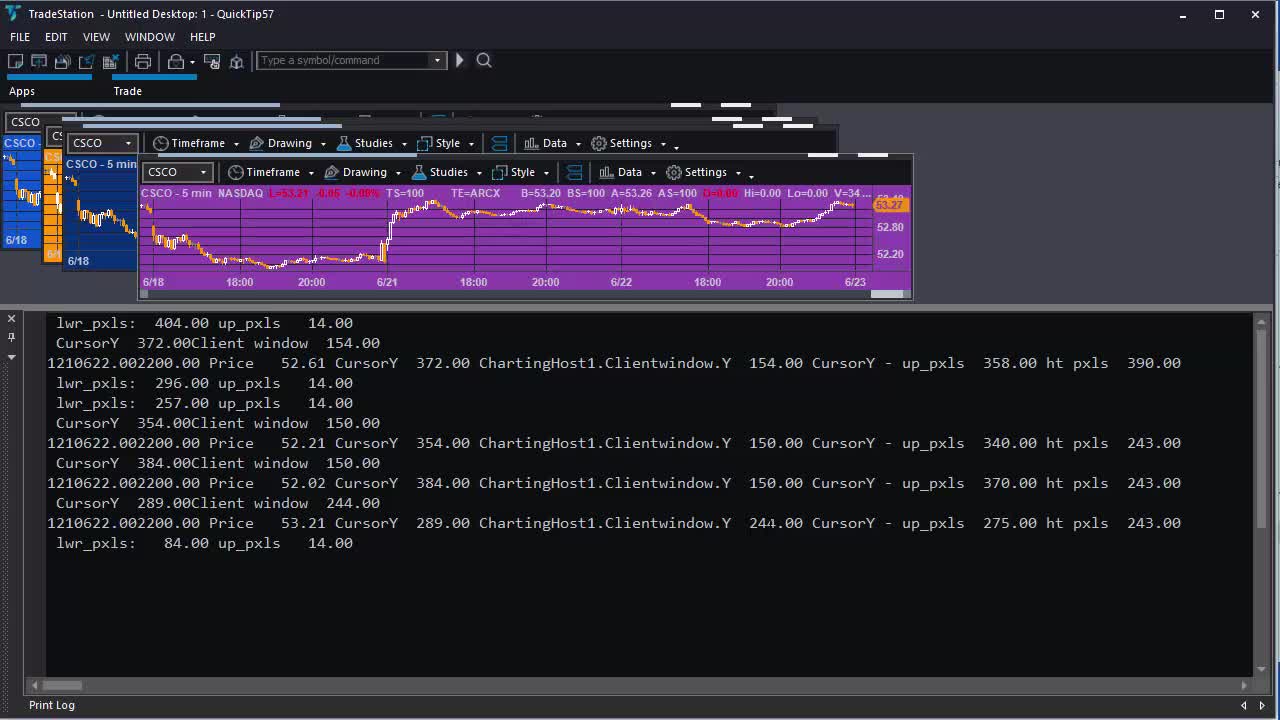
Quick-tip 57 | Find price where TradeStation chart clicked
4 years ago
16
_Quick-tip 57 is a TradeStation EasyLanguage tutorial for TradeStation 10 that demonstrates how to see the price level of a click on a chart. This information could, potentially be used by another algorithm (for example, creating an order ticket.) The tutorial uses the ChartElementClick event which is associated with a drawing object. The program also uses the charting host object to detect when the chart is clicked.
The program works by working out the price at the top and bottom of the chart window. It calculates click position in pixels relative to the top and bottom of the chart window and use this data to calculate what price level was clicked.
Loading comments...
-
 2:24
2:24
Redneck Investing
4 years agoThe Price Gouging Has Begun! Where You Can Still Find Silver 1:15 Pm 1/31
825 -
 4:09
4:09
Markplex
4 years agoQuick-tip 52 | Using the TradeStation scanner during the formation of a bar
15 -
 5:01
5:01
Markplex
4 years agoTradeStation EasyLanguage Quick-tip 50 | Find the lowest RSI and how many bars ago it occurred
34 -
 6:22
6:22
KTNV
4 years agoWhere to Find the Cash
492 -
 0:26
0:26
ahzm79
4 years agoHere is a place where you can find peace!
43 -
 2:39:04
TimcastIRL
10 hours agoMarijuana LEGALIZATION IS COMING, Trump Orders Weed To Schedule 3 In HUGE Move | Timcast IRL
124K105 -
 2:02:44
megimu32
9 hours agoON THE SUBJECT: CHRISTMAS CORE MEMORIES
51.2K6 -
 2:16:09
DLDAfterDark
8 hours ago $5.41 earnedThe Very Merry HotDog Waffle Christmas Stream! Gun Talk - God, Guns, and Gear
44.2K9 -
 1:19:51
Tundra Tactical
19 hours ago $18.09 earnedThursday Night Gun Fun!!! The Worlds Okayest Gun Show
68.3K -
 55:11
55:11
Sarah Westall
1 day agoHumanity Unchained: The Awakening of the Divine Feminine & Masculine w/ Dr. Brianna Ladapo
54.6K5